
Get Ready for Your 2025/26 Blackboard Modules
It’s that time of year again, and we have begun the rollout of Blackboard modules for the upcoming 2025/26 academic year. While some modules may take a little time to appear, most will be available by Tuesday next week (12.08.25).
This blog outlines everything you need to know to get started, including key updates, helpful reminders, and new tools to support your module setup.
Where Are My New Modules?
We’re creating the following types of Blackboard modules for 2025/26:
- Standard teaching modules based on the latest SITS data.
- Support modules, where a 2024/25 version was in use with enrolled students. These have been rolled forward with updated cohort data and module names where appropriate.
All modules are built from your school’s official Blackboard template, which colleagues have updated for the new academic year. Please don’t overwrite this with content from previous years.
If you’re missing a module, your School Admin Team can help, either through SITS or the Support Module Website.
Where Do I Start?
At the top of every Blackboard module, you’ll find a section titled Staff: Getting Started with your Ultra Module (or similar). This outlines all the key actions needed to prepare your module for students.
What About Outside of Blackboard?
Yes, Reading Lists.
Every module contains a Reading List link which enables students to view the latest reading list in Reading Lists Online (RLO).
There are two essential actions needed to get your Reading List up and running.
1. Login to Reading Lists Online http://readinglists.tees.ac.uk to check the list details and contents for each module. Amend, add or remove any items as necessary.
When adding items to lists, please make use of Discovery to identify relevant materials held in the Library’s extensive collection of book titles, electronic journal titles and articles, rather than requesting new resources. To support the blended model of delivery you should prioritise online resources rather than print resources as far as possible.
More information about online resources: libguides.tees.ac.uk/RLO/onlineresources.
2. Publish the list if you have made changes to it OR Request Review by the Library Team (found under Edit menu) even if no changes have been made.
New or Updated Features for 2025/26
Unused Files Tool
All Blackboard modules have a 1GB content limit for uploaded files. This doesn’t include video content added via ReView.
However, when a content item like a PowerPoint is deleted from your module, the actual file may still remain in the background and continue to take up space. The Unused Files tool helps you easily identify these files and manage this situation.
To access it:
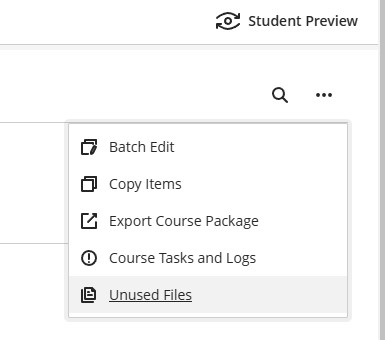
1. Click the three dots (top-right of your module homepage, under Student Preview).
2. Select Unused Files.
3. From there, select the required files to delete that are no longer in use. Don’t worry, the system won’t let you delete anything still linked in your content.
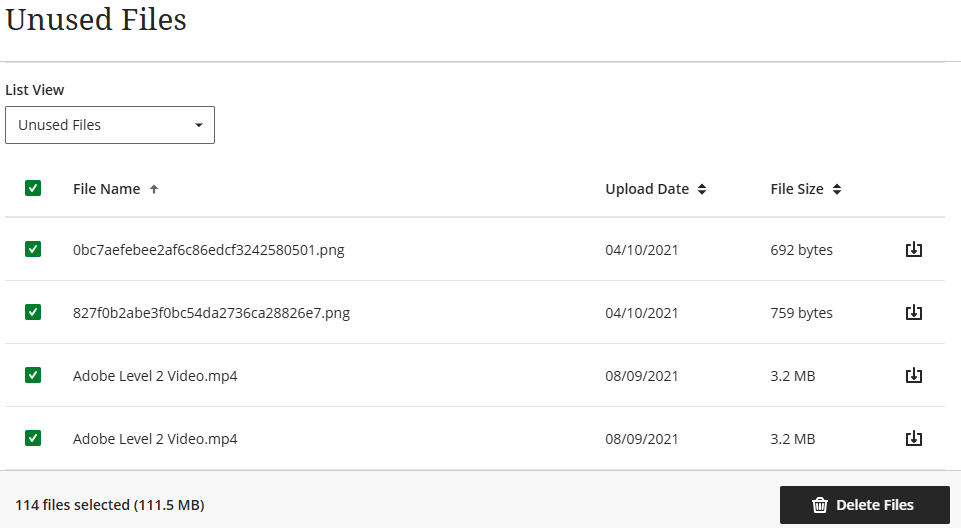
*NOTE A more detailed blog post on the Unused Files tool is coming soon, including guidance and screenshots.
Turnitin Updates
The new Turnitin grading and feedback interface is now live. For a full overview of what’s changed, visit our earlier blog post: Turnitin’s Enhanced Experience – What You Need to Know
Automatic Enrolments for Module Leaders
Module Leader and External Examiner enrolments are now automatically uploaded from SITS for both current and previous academic years. This removes the need for Schools to request enrolments for last year’s modules.
Want to Clean Up Old Enrolments?
If you have hundreds (or even thousands) of older module enrolments cluttering your Blackboard account, we can help. Email cst@tees.ac.uk if you’d like us to remove these in bulk.
What About Last Year’s Modules?
Don’t worry, your 2024/25 modules haven’t been changed or deleted. They’re still available and have been renamed with a “(2024-5)” prefix to help distinguish them from the new year’s modules.
Need Help?
If you have any questions or run into issues, you can contact us at: cst@tees.ac.uk
Good Information
Regards, Unissula