
New Feature Alert: Download Adobe Express Webpages as PDFs!
We’re excited to share a fantastic new feature in Adobe Express that’s perfect for students and educators alike—you can now download your Adobe Express webpages as PDFs!
Why This Matters
Adobe Express webpages are a powerful tool for students to curate, present, and showcase their work in a visually engaging format. With access to a wide range of copyright-free design assets and customizable templates, students can create rich, multimedia webpages that include:
- Embedded videos
- Uploaded photos
- Recorded audio
- Collaborative editing with peers
As an Adobe Education Creative Campus Adobe Express can be accessed via your university sign-in credentials at: new.express.adobe.com
Once complete, these webpages can be shared via a link for easy viewing. But now, with the new PDF download feature, students can also preserve their work as a permanent record perfect for archiving and assessment purposes.
Ideal for ICA Submissions
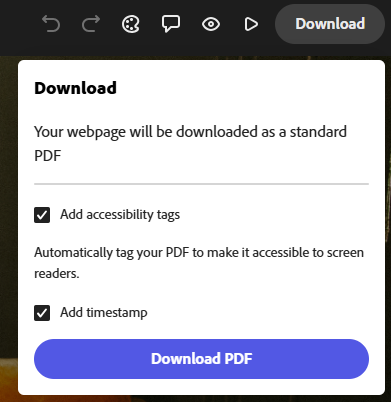
This update is especially useful for Individual Coursework Assignments (ICAs). By downloading the webpage as a PDF, students can upload a static, timestamped version of their work to the VLE (Virtual Learning Environment), ensuring it’s stored securely for the required retention period.
Timestamp Feature for Submission Integrity
Another great addition is the timestamp option. Before submitting their work, students can now select this feature to lock in the date, providing clear evidence that no changes were made after the submission deadline. This adds an extra layer of transparency and trust to the submission process.
When submitting an Adobe Express webpage for an ICA, students can now:
- Download the webpage as a PDF
- Enable the timestamp
- Upload the PDF to the VLE as a verified record of their work

For further information and support in integrating Adobe into your teaching and ICAs please contact Digital Learning Specialists via elearning@tees.ac.uk